AI Watermark Remover
Erase logos, stamps, date burn-ins and text overlays from any photo with AI. Upload an image, let the model rebuild what was hidden underneath, then compare your before and after on a slider. Free, no signup, no watermark of our own.
Free
no account needed
Frankfurt
stored in the EU
2 hours
then files are deleted
Drag & drop an image
or click to browse, or paste one from your clipboard with ⌘V / Ctrl+V
JPG, PNG, WebP, BMP or TIFF, up to 30 MB
Only upload images you own or have the right to edit.
Files are private and deleted automatically after 2 hours.
How to remove a watermark from a photo
Novitora finds the stamped overlay and paints the picture back in underneath it. There is nothing to select, mask or brush, and nothing to install. Three steps, one upload, and the result comes back at the same pixel size you started with.
Upload your image
Drag a JPG, PNG, WebP, BMP or TIFF into the box, click to browse your device, or paste a screenshot straight from your clipboard with ⌘V or Ctrl+V. Anything up to 30 MB is accepted.
Let the AI erase the mark
The model locates the watermark, separates it from the photo behind it, and reconstructs the covered pixels from the surrounding colour, texture and detail. There is nothing to select first and no strength slider to guess at.
Compare and download
Drag the divider across your own result to inspect the repair before you commit to it, then download the cleaned image at full resolution, free and with nothing stamped on it. Both files leave our servers within 2 hours.
Watermarks this tool can remove
Not every watermark is a small corner logo. Stock previews tile text across the whole frame, phone cameras burn a date into the pixels, marketplaces drop a semi-transparent badge over the product, and design apps sign the corner of every free export. The engine treats them all the same way: identify the overlay, then rebuild what it was hiding out of the picture that surrounds it.
Semi-transparent logos
The classic brand mark in the bottom-right corner of a product shot, screenshot or export. Low contrast against a busy background is exactly the case AI inpainting handles best, because the texture it needs to copy from is right beside the mark.
Tiled or repeated text
Preview images from stock libraries and photo printers stamp the same word across the whole picture, sometimes dozens of times. Every repeat is removed in a single pass, not one at a time, and the spacing between them gives the model clean reference to work from.
Date and time stamps
Burned-in camera dates in the corner of a scanned print or an old phone photo. The orange digits come out and the sky, wall or grass behind them comes back, so the photo can go into an album without a 2004 timestamp on it.
Diagonal text bars
Draft, sample, confidential and copyright banners running across the frame. Long straight overlays are among the easier cases: the mark is predictable and there is plenty of untouched picture on either side of it to rebuild from.
Site URLs and handles
A domain, username or social handle typed over a photo before it was reposted. Small text sitting on an even area usually disappears without a trace; over fine detail it may leave a faint softness where the letters were.
Badges and sticker overlays
Sale flashes, app export badges and template corner marks sitting on top of the image. They come off as a block, leaving the framing, colours and composition of the original photo exactly as they were.
When a watermark remover actually helps
This tool exists for the pictures you are entitled to clean up: your own work that came back stamped, a licensed file delivered with a preview mark, or an old photo carrying a date you no longer want on it. Ownership is the line, and respecting it is on you. If the image is not yours and nobody has given you the right to edit it, the mark is doing its job and should stay.
- Recover your own photography after an editor, printer or lab returned the file with a preview stamp burned into it.
- Clean off the export badge a free design, mock-up or video app added to an image you created yourself.
- Remove a date stamp from scanned family prints and early phone photos before printing an album or a photo book.
- Strip a template's placeholder branding out of a layout or mock-up you built for your own project or client.
- Tidy up product photography you shot yourself before it goes onto a shop listing or a marketplace page.
- Take a former agency's URL or logo off images you commissioned, paid for and now own outright.
Why remove watermarks with Novitora
Most free watermark removers hand back a shrunk, blurred or re-stamped file, and ask for an account before they do it. This one does not. Full resolution in, full resolution out, no logo of ours, no signup, and the result is yours the moment it appears.
Same pixels, same size
The cleaned image comes back at the exact dimensions you uploaded, so it drops straight into the layout, listing or print job it was made for. Nothing is cropped and nothing is resampled.
See the repair before you commit
Your own result is shown as a live before and after slider, not a stock demo picked to flatter the model. Drag the divider across the area that mattered, at your own pace, and decide from there whether to keep it.
Free and unwatermarked
No account, no daily quota, no ad to sit through, and no Novitora badge stamped onto the download. Plenty of free watermark removers hand back a file carrying a mark of their own, which rather defeats the point.
Private by design
Images travel over an encrypted connection and are deleted automatically within 2 hours, upload and result alike. Nothing is kept or used to train a model.
Before and after
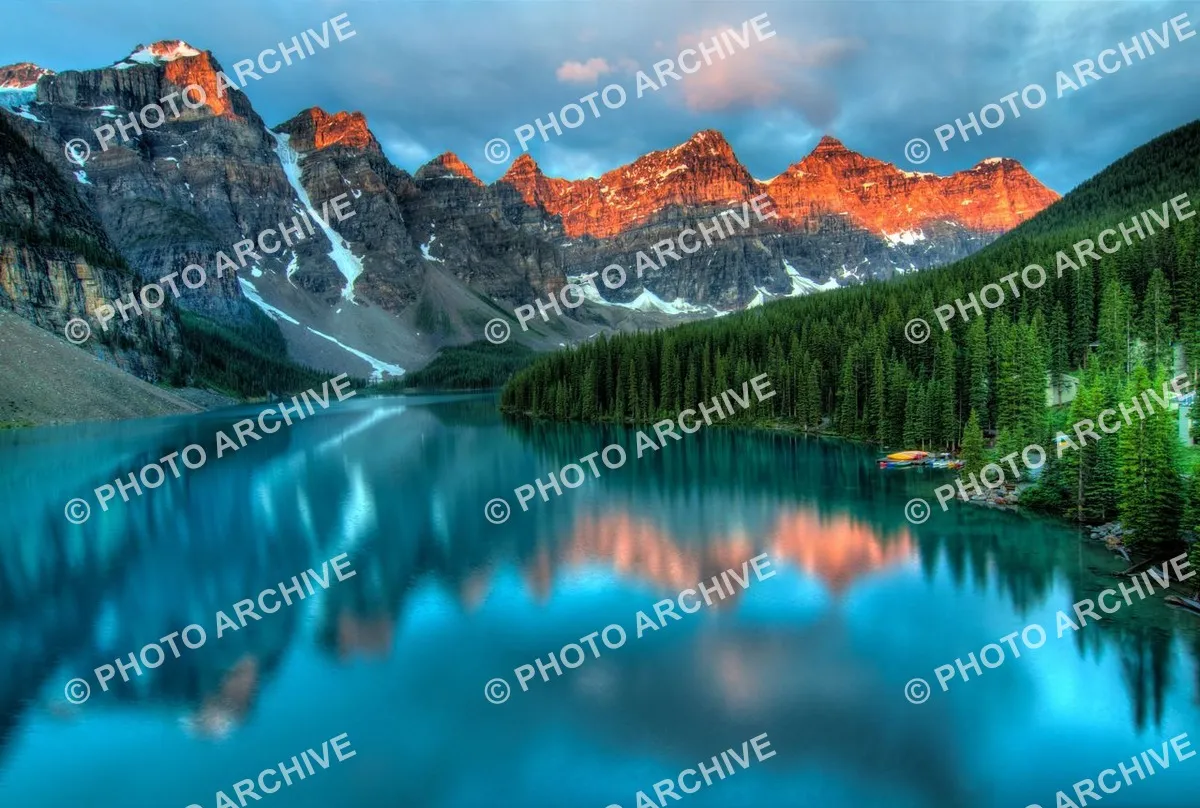
Here is a real pass over a mountain-lake photo that came back covered in a dense, repeating “© PHOTO ARCHIVE” watermark. The tiles fall across the sky, the sunlit peaks and the water at once, which is the hard case: three very different textures under one overlay, plus fine tree lines and reflections the repair has to keep intact. A corner logo on a blank wall would prove very little; this does not.
The cleaned version keeps the ridge detail and the reflections, and the sky reads as clouds again rather than a patch of blur. Run your own picture through the same test in the tool above, dragging the divider over whichever part of the frame you care about most, before you download anything.

Results depend on what the mark was covering. A thin overlay on an even background disappears completely, while a heavy mark over fine detail such as printed text, a patterned fabric or a face can leave a slightly soft patch. That is why the comparison slider sits in the tool itself: you judge the repair on your own photo, not on ours.
Related image tools
Blur Face
Detect and blur every face in a photo, in your browser.Thumbnail Generator
Create a PNG thumbnail from a PDF page, a video frame or an image.Image Enhancer
Sharpen and clean up photos for a crisper, richer picture.Image Enlarger
Enlarge small or low-resolution images.Image Upscaler
Increase image resolution for large displays and prints.Crop Image
Cut unwanted parts out of any image.Passport Photo Maker
Make a compliant passport, visa or ID photo for 70+ documents.Remove Metadata
Strip EXIF, GPS and other hidden metadata from photos.- New
Remove C2PA Metadata
Strip C2PA Content Credentials and keep everything else, in your browser. Image Resizer
Resize images to specific dimensions for web, apps, or print.Remove Background
Remove backgrounds from images instantly.Colorize Photo
Bring black and white photos to life with realistic AI colour.Image Info
Check an image's dimensions, size, format and print size.AI Photo Editor
Edit photos by describing the change in plain words.URL to JPG
Capture any public web page as a JPG image.URL to PNG
Capture any public web page as a crisp PNG image.
Frequently asked questions
Still have questions? Contact support.
Is the watermark remover free?
Yes. Removing a watermark on Novitora is completely free, with no signup, no account and no daily quota. You can upload an image, run the removal, compare the result and download it at full resolution without paying. There is no premium tier that unlocks a bigger image, a cleaner pass or a faster queue, and we never stamp our own logo onto the file you take away. The tool is funded the same way the rest of the site is, so there is nothing held back behind a paywall.
Is it legal to remove a watermark?
It depends entirely on who owns the image. Removing a mark from your own photo, from a file you have licensed, or from work you commissioned and own is fine. Stripping a watermark from someone else's picture so you can use it without permission is not, and in many countries that is treated as a separate offence from the copyright infringement itself. Only upload images you own or have the right to edit.
Which image formats can I upload?
JPG, JPEG, PNG, WebP, BMP, TIFF and TIF, up to 30 MB per image. A JPG comes back as a JPG and every other format comes back as a PNG, so a PNG keeps its transparency. If your file is a HEIC photo from an iPhone, convert it to JPG with our free converter first and then run it through here. RAW camera files should be exported to JPG or TIFF before uploading, since the watermark will have been added to the exported copy anyway.
Will the photo lose quality or come back smaller?
No. The engine returns the image at exactly the pixel dimensions you uploaded, and only the area under the watermark is rewritten. The rest of the picture is untouched, so sharpness, colour and framing match the original. Nothing is downscaled to a preview size and no visible logo is added, which are the two usual catches with free watermark removers. A JPG is re-encoded once on the way out, so save the result rather than running it through the tool repeatedly.
How good is the result?
It depends on what the mark was hiding. A watermark over sky, a wall, grass or any even surface usually disappears without a trace, because there is plenty of matching texture nearby to rebuild from. A dense mark sitting over fine detail such as printed text, patterned fabric or a face is much harder and can leave a slightly soft patch where the letters were. Use the before and after slider to judge your own picture before you download it, and try a higher-resolution copy of the same photo if the first pass is not clean enough.
Do I need to select or mask the watermark first?
No. Detection is automatic: upload the image and press one button. There are no brushes, lassos, layers or settings to tune, and no second step where you paint over the mark. That is deliberate, because the model finds the overlay far more reliably than a hand-drawn selection does, especially when the mark is tiled across the whole frame rather than parked in one corner and you would otherwise be selecting it dozens of times.
Can it remove a watermark that repeats across the whole image?
Yes, and it handles every repeat in one pass instead of making you erase them individually. Very heavy coverage is the limit: if the mark hides most of the photo, there is not enough real picture left to rebuild from, so the tool says so plainly rather than inventing a scene that was never there. When that happens, a larger or less heavily marked copy of the same image is usually the fix.
Does the download have a Novitora watermark on it?
No. The download is the cleaned image and nothing else, at full resolution, with no badge, corner logo or footer added. You do not need to share the file, create an account or watch an ad to unlock it either.
What happens to my images?
Your upload is sent over an encrypted connection for processing, and then both the original and the result are deleted automatically within 2 hours. Novitora never asks you to create an account and does not use your photos to train anything. Nothing about the image is retained once the two-hour window closes.
Can I remove a watermark from a video or a PDF?
Not with this tool, which works on still images. A PDF page exported as an image can be run through here, and our PDF tools cover the document side of the job, including adding or replacing a watermark of your own. Video watermark removal is not something Novitora offers yet, though a single frame exported as a JPG will work exactly like any other photo.